Flutter SDK, Release Channels & Platform Toolchains
You install Flutter, run flutter doctor, and see one green check beside Chrome, a warning beside Android, and an error beside Xcode. Is Flutter broken?
Not necessarily. The command is reporting capabilities, not one universal pass-or-fail installation. A workstation can be ready for web development and not ready for Android or iOS.
The mental model for this chapter is:
The Flutter SDK orchestrates a build, but each target platform supplies part of its own toolchain. Read setup status against the platform you intend to run.
By the end, you will be able to identify the four layers involved in a Flutter build, choose a release channel, interpret flutter doctor, and decide which missing tool matters now.
Version boundary: Commands in this chapter were verified with Flutter 3.47.1 stable and Dart 3.13.1. Avoid memorizing those numbers; production projects should record and deliberately update their chosen SDK version.
1. One Command, Four Layers
The flutter command looks self-contained because it provides one interface. Behind that interface, a working run depends on four layers.
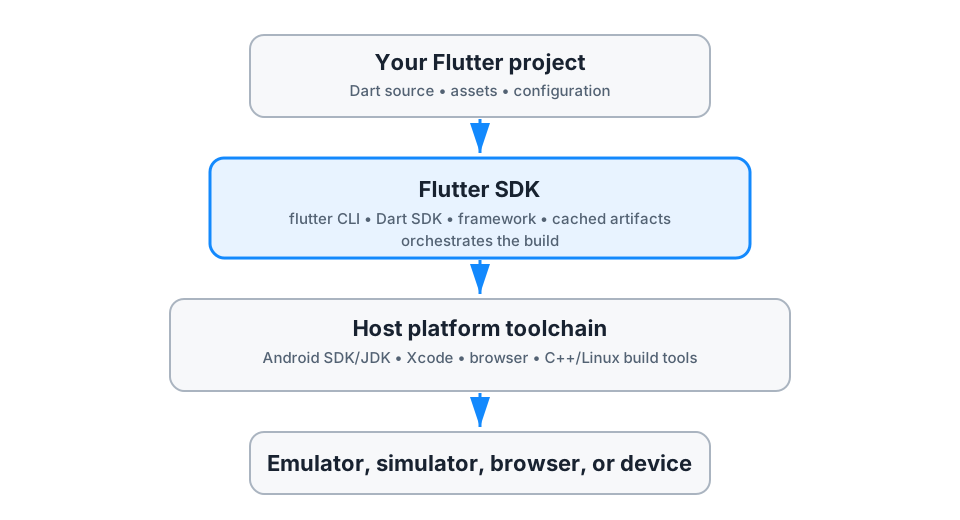
Figure 1 — The Flutter SDK coordinates the build; it does not replace Android, Apple, browser, Windows, or Linux tooling.
Layer 1: Your project
Your repository contains Dart source, tests, assets, dependency declarations, and small host applications for selected platforms. Chapter 3 examines that project structure and pubspec.yaml in detail.
Layer 2: The Flutter SDK
The SDK supplies the parts shared across Flutter development:
- the
fluttercommand-line tool; - the Dart SDK and
dartcommand; - Flutter framework libraries;
- development tooling and cached engine artifacts;
- build orchestration for supported targets.
The SDK knows how to ask a platform toolchain for an application. It is not every platform toolchain.
Layer 3: The host toolchain
A host is the computer doing the development and build. The target changes what the host must provide.
| Target | Host-side requirement at a high level | Important boundary |
|---|---|---|
| Web | Flutter SDK and a supported browser | Chrome or Edge provides the integrated debug target; web-server supports other browsers with more limited debugging. |
| Android | Android SDK, build tools, JDK, licenses, and a device or emulator | Android development can be configured on macOS, Windows, or Linux. |
| iOS | macOS, Xcode, iOS platform support, signing when using a device | You cannot build an iOS application from a Windows or Linux host using the normal local toolchain. |
| macOS | macOS and Xcode tooling | The host and target are macOS. |
| Windows | Windows and the Microsoft C++ desktop build toolchain | Visual Studio Code is an editor; it does not replace the Visual Studio C++ build tools. |
| Linux | Linux compiler and desktop development libraries | Exact packages vary by distribution. |
Layer 4: A runnable target
The final layer is an Android device, iOS simulator, browser, desktop window, or another supported target discovered by Flutter. A correct SDK plus a correct toolchain still cannot launch onto a device that is disconnected, unauthorized, or unavailable.
This layered model gives you a useful diagnostic question:
Which layer failed for the target I am trying to run?
2. The SDK Has a Version and a Channel
Run:
flutter --versionA typical result identifies the Flutter version, release channel, framework revision, engine revision, Dart version, and DevTools version. Those values describe one coordinated SDK installation.
What a release channel means
A release channel is a stream of SDK updates with a particular stability policy. Current Flutter tooling exposes three relevant channels:
| Channel | Intended use | Update posture |
|---|---|---|
stable | Learning, application development, CI, and production releases | Most tested and recommended default. |
beta | Early compatibility work and validation before changes reach stable | Newer changes with less production exposure than stable. |
main | Flutter framework contribution and earliest integration testing | Fastest-moving and most likely to contain regressions. |
List the channels and see the selected one:
flutter channelSwitching channels is explicit:
flutter channel beta
flutter upgrade
For a production application, choose stable unless you have a concrete reason not to. A valid reason might be testing an upcoming breaking change or confirming that a blocker is fixed in beta. “It has newer features” is not enough; the cost is greater change risk.
Channel is not project version control
The selected channel describes the SDK checkout on one machine. It does not, by itself, guarantee that every developer and CI runner uses the same Flutter release.
Developer A: stable, version X
Developer B: stable, version Y
CI runner:   stable, version Z
All three machines can honestly report stable and still compile with different versions. Teams therefore record an exact SDK version in project documentation, CI configuration, or an SDK-version manager. The mechanism is less important than the invariant:
Local development and CI should resolve to the same intended Flutter and Dart toolchain.
Upgrade deliberately
flutter upgrade updates the SDK on its current channel. That is a toolchain change, not routine dependency resolution.
A safe team upgrade has a visible boundary:
- choose the target Flutter version;
- review migration notes and breaking changes;
- update the development and CI environments together;
- run analysis, tests, and representative target builds;
- commit any required source or configuration changes as one reviewable change.
Use the Flutter SDK archive when a project needs an older release for compatibility or investigation. Do not silently downgrade one workstation and leave the version undocumented.
3. flutter doctor Is a Capability Report
Run:
flutter doctor -vThe verbose form adds paths and component versions, which matter when a machine has multiple JDKs, Android SDKs, Xcode installations, or Flutter SDKs.
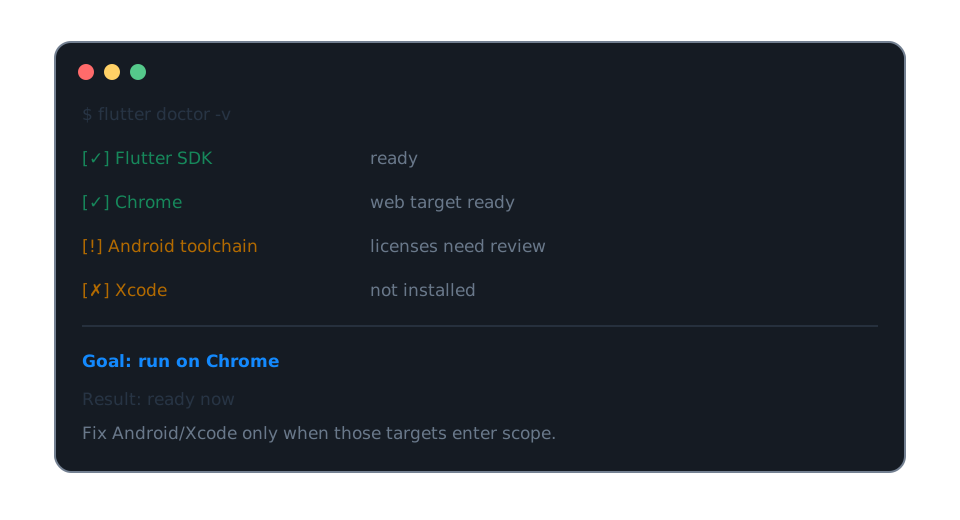
Figure 2 — A warning matters only when it blocks an intended target; the web setup shown here is already usable.
Read each line as a statement about a capability:
[✓]means Flutter found a usable component.[!]means the component exists but needs attention or has a partial problem.[✗]means Flutter cannot use that capability as configured.
The symbols do not determine priority. Your target does.
A disciplined diagnosis
Suppose your immediate goal is to run Reading Companion in Chrome:
[✓] Flutter
[!] Android toolchain
[✗] Xcode
[✓] Chrome
Chrome is ready, so you can begin. Android and iOS become actionable when those targets enter scope.
Now change the goal to an Android emulator. The same report has a blocker. Read the detailed Android line, fix the first concrete issue, and rerun flutter doctor -v. Common categories include a missing SDK component, unaccepted licenses, or no runnable device.
For Android license review, Flutter exposes:
flutter doctor --android-licensesRead licenses before accepting them. A tool command can open the workflow; it cannot make the legal decision for you.
Do not repair by random installation
A common failure pattern is installing more software until the report becomes green. This can create duplicate SDKs and PATH conflicts while hiding the original issue.
Use this sequence instead:
intended target
    ↓
first failing capability for that target
    ↓
path/version shown by flutter doctor -v
    ↓
target-specific setup instruction
    ↓
rerun the same diagnostic
Fix one causal layer at a time. If flutter itself is not found, an Android emulator is not yet the problem. If Flutter sees the Android toolchain but no devices, reinstalling Dart is not the solution.
4. PATH Decides Which SDK You Are Using
Your shell searches directories listed in its PATH environment variable to resolve a command such as flutter.
Check the resolved executable:
# macOS or Linux
which flutter

# Windows PowerShell
Get-Command flutter
Then compare it with:
flutter doctor -vThis matters when an IDE uses one Flutter SDK while the terminal uses another. The symptom can look irrational: the IDE accepts syntax that the terminal rejects, or local analysis disagrees with CI.
Correction: make the SDK selection explicit, restart terminals and IDEs after PATH changes, and verify with flutter --version in every execution environment that matters.
The Flutter SDK already includes a compatible Dart SDK. For Flutter projects, do not independently replace that Dart SDK in an attempt to resolve a Flutter/Dart version mismatch. Select the correct Flutter SDK instead.
5. Editors Help; Toolchains Build
VS Code, Android Studio, IntelliJ, and other editors can invoke Flutter commands, provide completion, launch debuggers, and display device selectors. They do not change the underlying dependency chain.
For example:
- the VS Code Flutter extension does not install the Android SDK for you;
- the Android Studio Flutter plugin does not replace the Flutter SDK;
- VS Code on Windows does not provide the Visual Studio C++ compiler required for Windows desktop builds;
- an editor on Windows cannot supply Apple’s Xcode toolchain.
When an IDE action fails, reproduce the boundary at the command line:
flutter --version
flutter doctor -v
flutter devices
This does not mean “never use the IDE.” It separates editor configuration from SDK, toolchain, and device configuration so you can identify the failing layer.
6. A Minimal Workstation Readiness Check
Use this checklist for a new machine or a CI image:
flutter --version
flutter channel
flutter doctor -v
flutter devices
Each command answers a different question:
| Command | Question answered |
|---|---|
flutter --version | Which coordinated Flutter/Dart SDK is executing? |
flutter channel | Which update stream is selected? |
flutter doctor -v | Which host capabilities are usable, partial, or missing? |
flutter devices | Which targets can this environment launch now? |
Do not collapse them into “Flutter works.” A machine may be able to analyze and test Dart code, run Chrome, and build Android while lacking iOS capability. That is a precise and useful state.
Practice: classify before fixing
For each scenario, identify the failing layer and the next diagnostic—not a guessed installation.
flutteris not recognized in a new terminal.flutter --versionworks, butflutter devicesshows no Android device.- Chrome runs, but the team requires iOS builds from a Windows laptop.
- Local analysis accepts code that CI rejects after a language feature is added.
Reference reasoning
- SDK discovery: inspect PATH and the resolved
flutterexecutable. - Target availability: check the device or emulator, authorization, and
flutter doctor -v; do not reinstall Flutter first. - Host boundary: local iOS builds require macOS and Xcode; use an appropriate Mac environment rather than searching for a Windows flag.
- Version drift: compare
flutter --versionlocally and in CI, then align the recorded toolchain version.
Chapter 2 uses this ready environment to create one project and launch it on mobile, web, and desktop. Chapter 3 then opens the generated project to explain what Flutter created and why.